Spelling Challenge PRO
- 4.5
- Rating
- 10.00K
- Installs
- $0.49
- Price
 Analysis by App-foxy
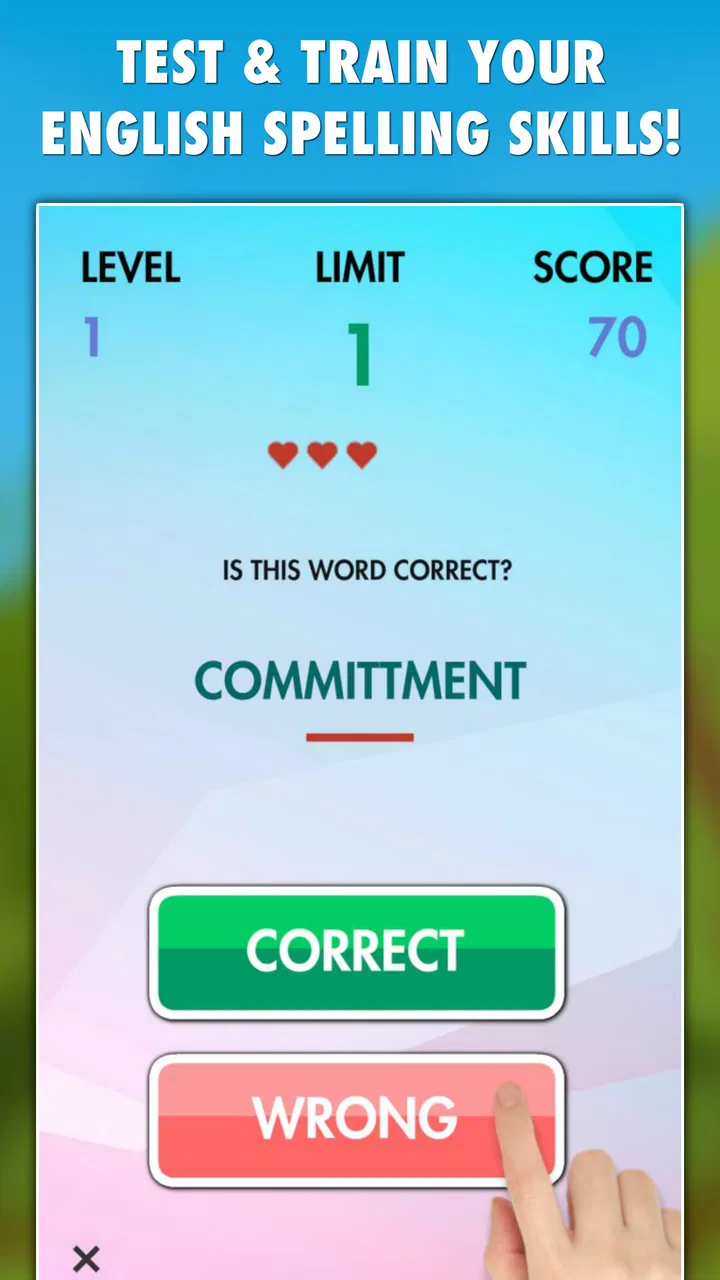
I found Spelling Challenge PRO most useful when I treated it as a quick shared activity rather than a full language course. It is a trivia game built around English spelling, and its compact format makes it easy to hand to another person for a few minutes. The central appeal is simple: you see a challenging word, choose or enter the spelling you believe is correct, and use the result to notice where your instincts are reliable or shaky.
That simplicity works particularly well in a household with a shared phone or tablet. One person can play while someone else watches, suggest an answer, and then argue cheerfully about whether a difficult word looks right. I would not present it as a replacement for a dictionary, classroom practice, or a structured vocabulary program. I see it instead as a focused little test that can turn spare moments into useful English practice.
A practical shared-device game for short sessions
My favorite way to use this game is in short rounds between ordinary tasks. If I am waiting for food, taking a break, or sitting with someone who wants a quick challenge, spelling questions are easier to start than a larger game that requires a long explanation. The trivia format also gives both players something to discuss: not just whether an answer is right, but why a particular spelling feels convincing.
You May Also Like

 Pandora - Music & Podcasts
Pandora’s Music Is Easy to Start, but Harder to Recover
Pandora’s strength is its low-effort path from a seed to a station. Its weak spot is how much confidence it asks you to place in connection, setup, and quiet recovery.

 AccuWeather: Weather Radar
AccuWeather Review: A Quick, Clear Forecast for Everyday Decisions
For everyday plans, the best forecast is the one you can understand quickly. AccuWeather makes rain timing, radar, and local conditions easy to act on, with a few trade-offs.

 Hill Climb Racing
Why Hill Climb Racing Still Turns Crashes Into One More Run
A tiny car, a bumpy hill and one more upgrade: Hill Climb Racing keeps resurfacing because its simple chaos makes every near-miss feel personal.

 AliExpress - Shopping App
AliExpress Makes Global Shopping Feel Personal, but Shoppers Bear the Risk
AliExpress turns a global marketplace into a pocket-sized discovery engine. Its reach is useful, its shopping loop compelling, and its trade-offs easy to miss.

 Lords Mobile: Kingdom Wars
Lords Mobile Is a Kingdom-Building Routine, Not a Quick Match
A case-by-case verdict on the building, battles, device demands, and social commitments that make Lords Mobile rewarding for some players and exhausting for others.

 PDF Scanner app - TapScanner
TapScanner Makes Paperwork Easier to Capture, Check, and Share
TapScanner makes scanning with a phone feel less like a rescue operation and more like a dependable step in getting work done. Its capture tools are useful, though not flawless.
More From Our News Desk
View All News


That shared-use quality matters because spelling is naturally discussable. A child can make a guess, an adult can explain a familiar pattern, and another player can point out a silent letter or an unusual combination. The game does not need to become a formal lesson to create that moment. In my experience, the strongest benefit comes from pausing after a mistake instead of immediately rushing into the next question.
There is also a useful trade-off here. A shared device makes the game social, but it can blur who is actually improving. If several people take turns, I recommend saying whose turn it is before answering and keeping the conversation focused on the word rather than on who made the error. The game itself is better at presenting challenges than at organizing a household competition, so the people using it need to provide that structure.
What the four modes change in everyday use
The game includes four modes, which gives it more flexibility than a single repeating quiz. I found that variety helpful when one style of challenge started to feel predictable. Instead of abandoning the app after a few tries, I could switch the way I approached the words and keep the activity feeling fresh.
I would not assume that every mode suits every player equally. Someone who enjoys rapid decisions may prefer a more energetic format, while a learner who needs time to inspect each word may benefit from a calmer option. The best way to use the modes is to match them to the purpose of the session: quick entertainment when several people are together, or slower concentration when one person wants to examine spelling carefully.
A non-obvious advantage of having multiple modes is that it exposes different kinds of weakness. A player may recognize a word when it appears in context but hesitate when forced to recall its spelling. Another may do well when there is time to think but lose accuracy under pressure. Moving between modes can reveal that difference more clearly than repeating one format.
My practical tip is to change modes only after identifying what you want from the next session. If the goal is relaxed household play, choose the format that keeps conversation moving. If the goal is personal practice, use the mode that makes you slow down and inspect each answer. Without that intention, the extra choice can feel like decoration rather than a useful tool.
Setting clear boundaries before handing it to someone else
Because this is a small spelling game, setup is straightforward, but shared use still benefits from a little planning. I would first decide whether the device is being used for a single person’s practice or for several people taking turns. That boundary prevents a younger player from opening a session expecting a private challenge and finding that another person has taken over the conversation.
I would also agree on how answers are handled. Are players allowed to discuss a word before choosing? Does the person holding the device answer alone? Do you replay a difficult item, or simply remember it for later? These are not built-in household controls; they are simple rules that make the game feel fair when it is passed around.
That distinction is important for parents and anyone sharing a device with a child. The game is rated for Everyone, which makes its subject matter broadly approachable, but an age label does not replace supervision or judgment about a particular child’s reading ability. A younger learner may need help understanding a word before spelling it, while an older learner may find the same challenge too easy or too narrow.
I would avoid presenting the game as a test of intelligence. Spelling contains familiar patterns, but it also contains exceptions and words that are simply less common. A wrong answer often means “this word needs practice,” not “this player is bad at English.” That tone makes a real difference when the app is used by siblings or across different skill levels.
Coordinating turns without turning practice into pressure
In a household setting, coordination is the part that determines whether the game feels welcoming. I prefer short, clearly defined turns. One person reads or views the challenge, answers without interruption, and then everyone discusses the result briefly. After that, the device moves to the next player. This keeps the fastest or most confident participant from dominating every round.
A useful routine is to let the player explain their reasoning after an uncertain answer. Perhaps the word resembles another word, or a silent letter seemed likely. That explanation can reveal a spelling habit worth working on. It also gives other players a chance to learn without simply shouting the correct choice.
For a family using one device, I would keep a simple spoken record rather than inventing a complicated scoring system. You might remember a few words that caused trouble and revisit them later. This is more valuable than treating the game as a permanent leaderboard, especially when players have different ages, reading backgrounds, or amounts of experience with English.
The game’s four modes can support coordination, but they do not remove the need for a household routine. I would not expect it to manage profiles, assign turns, or separate one person’s progress from another’s. If individual tracking is essential, a dedicated learning platform with explicit learner accounts may be a better fit. For casual shared play, however, a verbal turn-taking system is usually enough.
Age, trust, and the limits of a general rating
The Everyone rating is reassuring for a family looking for a low-risk trivia activity, and the subject is naturally more educational than many casual games. Still, I would judge suitability by the player’s English level rather than by age alone. A child who is still building basic vocabulary may need an adult to explain unfamiliar words, while a fluent adult may want more demanding material than a short spelling quiz can provide.
This is also where trust matters. If a child is using a shared phone, I would explain that the game is for spelling practice and agree on when the device should be returned. The app can be a positive part of a routine, but it should not become an excuse for unrestricted device time. Since the game is designed around answering challenges, an adult can easily sit nearby and make the activity feel intentional.
I appreciate that the concept is easy to explain without promising more than it delivers. It tests spelling; it does not automatically teach every word in depth. If a player wants a definition, pronunciation, example sentence, or a personal vocabulary plan, I would pair the game with a trusted reference source or a more comprehensive language-learning tool. That combination is stronger than expecting one small trivia app to cover all of English.
Another trust-related point is how feedback is discussed. When a word is unfamiliar, I would verify it using a dictionary rather than arguing from memory. That habit turns uncertainty into a useful learning step and avoids teaching a confident but incorrect correction. The game starts the conversation, but careful follow-up is what makes the conversation reliable.
How it compares with ordinary spelling alternatives
Compared with flashcards, this game feels less like memorization and more like a challenge. Flashcards are better when I already know which words I want to study and need repeated review. Spelling Challenge PRO is more convenient when I want to discover weak spots without preparing a list first.
Compared with a general word puzzle, it stays more focused. Crossword-style games can build vocabulary and pattern recognition, but the surrounding clues may let a player solve an answer without truly thinking about its spelling. Here, the spelling task is the main event, which makes the practice more direct.
Compared with a full language-learning app, it is lighter and easier to start, but much narrower. A broader course will usually be preferable for grammar, listening, pronunciation, progress planning, or guided lessons. I would choose this game when the specific goal is to challenge English spelling in spare moments, not when someone needs a complete curriculum.
The price is another part of that decision. At $0.49, it is inexpensive for a focused game, but the right question is still whether its narrow purpose matches your household’s needs. A low cost does not make a limited tool suitable for everyone. If your family wants one app to serve reading, vocabulary, grammar, and pronunciation, this is not the efficient choice.
Who will enjoy it, and who should skip it
I would recommend it to people who like word trivia, learners who want a quick spelling workout, and households that enjoy taking turns on one device. It is especially suitable for someone who prefers small challenges over long lessons. The four modes give repeat users a reason to vary their sessions, while the large supply of tricky words helps prevent the experience from feeling like a single fixed quiz.
I would be more cautious about recommending it to a beginner who cannot yet understand many of the words presented. Guessing unfamiliar vocabulary may be frustrating, and the game alone may not provide enough explanation to turn every mistake into a lesson. In that situation, a guided learning app or an adult-led reading routine would probably offer more support.
I would also skip it if you need detailed individual progress records, formal classroom reporting, or a carefully sequenced course. Nothing about the basic concept suggests that it is intended to replace those tools. Its strength is immediacy: open it, choose a challenge, and test your spelling. Its weakness is that the surrounding learning plan has to come from you.
For competitive households, I would recommend agreeing in advance that speed is not the only measure of success. A player who takes longer but learns a difficult pattern may gain more than someone who guesses quickly. The game works best when competition adds energy without turning mistakes into embarrassment.
What I would do after a difficult word
The most useful workflow I found was to treat mistakes as a small study list. After a session, I would remember two or three words that caused hesitation, write them down elsewhere, and use them in a sentence later. That extra step is not a feature I would attribute to the game; it is a practical habit that makes the game’s questions more memorable.
For shared use, one person can say the word aloud while another spells it, then switch roles. This separates listening from visual recognition and can reveal whether the problem is the spelling itself or simply unfamiliarity with the word. I would keep the exercise brief so it remains playful rather than becoming an unexpected lesson.
Another useful approach is to group mistakes by pattern. If several words expose confusion about doubled consonants, silent letters, or similar endings, that pattern gives you a better target than a random list of isolated errors. The game supplies the prompts; the player or supervising adult supplies the reflection.
I would not replay every missed word immediately. Immediate repetition can create the feeling of success without proving that the spelling has been remembered. Waiting until later, then trying again without looking, gives a more honest indication of progress. This is a small but important trade-off between instant satisfaction and durable learning.
Device fit, cost, and practical expectations
The game was released on June 18, 2019, and its minimum operating-system requirement is Android 2.3. That makes it potentially suitable for older Android hardware, which is useful if a household keeps an older phone or tablet for shared activities. I would still judge the experience on the actual device, since older hardware can make any app feel less comfortable to use even when it meets the stated requirement.
Its audience appears modest rather than enormous: the game has over ten thousand installs, an average rating of 4.5 from around eighty-five ratings, and nine written reviews. I read that as a sign of a focused niche, not as proof that it will suit every spelling learner. The rating is encouraging, but the small review volume means I would rely more on the game’s purpose and your household’s expectations than on popularity alone.
LittleBigPlay - Word, Educational & Puzzle Games is clearly working in a space where small, focused word activities make sense. That identity helps explain why this title feels more like a compact practice game than a large educational system. I appreciate that focus, provided the buyer understands the boundaries before paying.
Because the price is only $0.49, the financial risk is low, but the time cost still matters. If a child dislikes spelling challenges, a cheap purchase will not change that. If several people already enjoy word games, the same small purchase can provide a convenient shared activity with more educational value than a purely random guessing game.
My household verdict
After using it as a shared trivia activity, I see Spelling Challenge PRO as a good fit for households that want a simple, low-cost way to make English spelling part of a short break. The four modes and difficult vocabulary give it more staying power than a one-question novelty, while the focused design keeps it easy to explain to a new player.
My recommendation comes with a clear condition: use it as a prompt for practice, not as the entire learning plan. Set turn-taking rules, respect different ages and confidence levels, and discuss unfamiliar words instead of treating wrong answers as failures. Those small boundaries make the experience more useful and more pleasant on a shared device.
The game is suitable for Everyone, but suitability still depends on language ability and household expectations. A beginner may need help, a serious student may need a fuller course, and a family seeking profiles or formal progress tracking should look elsewhere. For casual spelling challenges, however, the low price and compact format make it an easy addition to a household’s collection of short activities.
My final take: I would choose it for friendly, repeatable spelling rounds with one or more people, especially when we want something educational without setting up a lesson. I would not choose it as a complete English-learning solution. Used within that boundary, it does its small job well: it turns tricky spelling into a conversation, a challenge, and occasionally a word I remember long after the session ends.
FAQs for Spelling Challenge PRO
01What is Spelling Challenge PRO?
Spelling Challenge PRO is an educational word game designed to help players improve spelling, vocabulary, and concentration through interactive challenges. It typically presents words or spelling tasks that must be completed accurately, often with increasing difficulty. The app can be useful for students, families, and adults who want a more entertaining alternative to traditional spelling practice, although the exact modes and word lists may vary by version.
02Is Spelling Challenge PRO suitable for children and beginners?
The game can be suitable for children, beginners, and anyone looking to practice common English spelling, especially when the early challenges are relatively simple. However, parents should review the available difficulty settings, vocabulary level, and advertising or purchase options before handing it to younger users. Players with advanced spelling skills may find the introductory stages easy and may prefer higher levels or timed challenges.
03Does Spelling Challenge PRO work offline?
Many spelling games allow at least part of their core gameplay to work without an internet connection, which is convenient for travel, school practice, or areas with unreliable service. Nevertheless, online access may still be required for the first download, updates, advertisements, leaderboards, analytics, or restoring purchases. Check the app-store description and test the main game after installation if offline availability is important to you.
04Does Spelling Challenge PRO include in-app purchases or advertisements?
The availability of advertisements, premium features, and in-app purchases depends on the edition and platform version of Spelling Challenge PRO. Some releases may offer a paid download while others may unlock extra content through optional purchases. Before downloading, review the store listing for pricing and payment details, and use parental controls if children will play. Also check whether removing ads or unlocking advanced levels requires an additional fee.
05What devices are compatible with Spelling Challenge PRO?
Compatibility depends on the specific Android or iOS release, operating-system requirements, and the developer’s latest updates. Before installing, confirm that your phone or tablet meets the minimum system version and has enough free storage. Older devices may install the game but experience slower performance, scaling problems, or missing features. It is also wise to verify recent update information, permissions, and user reviews for your particular device.
Pros
- Helpful for improving spelling through short
- focused challenges.
- PRO version offers a cleaner experience with fewer interruptions.
- Suitable for quick practice sessions during spare moments.
- Progressive difficulty keeps exercises engaging for regular learners.
- Simple controls make it accessible for children and casual users.
Cons
- Some challenges may feel repetitive after extended play.
- Advanced learners may find the word selection too limited.
- Requires careful reading
- as small mistakes can end a round.
- Progress tracking may not provide enough detailed feedback.
- The PRO upgrade may feel unnecessary for occasional practice.

Spelling Challenge PRO
Gallery